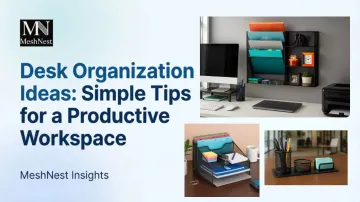
A chaotic desk doesn't just look messy — it actively drains focus before the day begins. This guide delivers practical, straightforward desk organization ideas anyone can apply, whether working from home or in a corporate office, without needing a complete remodel or expensive overhaul.
Key Takeaways
- Declutter first — only keep what you use daily on your desk surface
- Use vertical space with risers, shelves, and stackable organizers to add storage without expanding your footprint
- Assign a dedicated container to every category — scatter stops when everything has a home
- Tackle cables and paper flow — they're the two biggest sources of visual chaos on any desk
- A 5-minute daily reset habit prevents clutter from rebuilding
Why an Organized Desk Makes You More Productive
Your desk isn't just a work surface — it's a cognitive battleground. Visual clutter alters how information flows in the brain's primary visual cortex, reducing processing efficiency and making it harder to identify target objects, according to 2024 research from Yale University.
That visual interference compounds quickly. Cognitive load theory tells us working memory is limited — and when your desk is scattered with papers, random supplies, and tangled cables, your brain unconsciously processes every visible object. That's mental energy pulled away from the actual work in front of you.
The real-world impact? Participants working at a messy desk took nearly 10% longer to answer questions in cognitive tasks compared to those at a neat desk, according to Harvard Business Review research. Disorganized environments threaten personal control and deplete self-regulatory resources.
Beyond speed, an organized desk delivers:
- Faster retrieval of supplies and documents
- A more professional appearance on video calls
- Reduced daily friction and decision fatigue
- Lower physiological stress levels throughout the workday
Each of these adds up — and the right organizational tools make all of them easier to sustain.
Step One: Declutter Before You Organize
You cannot organize clutter — you can only rearrange it. Start with the "clear slate" method: remove everything from your desk surface before placing anything back.
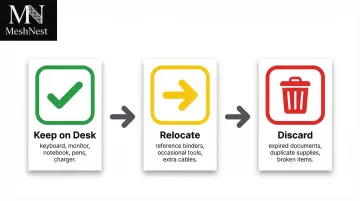
Apply a simple three-category sort:
- Keep on desk — used daily (keyboard, monitor, pen cup, notepad)
- Relocate — used occasionally, belongs in a drawer or shelf (stapler, tape, chargers)
- Discard — no longer needed (dried-out pens, outdated notes, duplicate supplies)
A simple rule helps cut through indecision: if you haven't reached for it in the past week, it does not belong on your primary work surface.
The time cost of skipping this step is real. Knowledge workers spend an average of 1.8 hours every day searching for and gathering information, according to 2012 research — and a cluttered desk only compounds that friction.
Decluttering checklist:
- Remove all items from desk surface
- Sort into three piles: keep, relocate, discard
- Clean the bare surface thoroughly
- Return only daily-use items to the desk
- Store or discard the rest immediately
Once the surface is clear, everything you bring back has a defined purpose — which makes the next step, organizing what stays, far more effective.
The Best Storage Solutions for a Tidy Desk
Desk Organizers for Everyday Essentials
When every category of supply has a fixed home, tidying takes seconds and items are always findable. Dedicated containers eliminate the daily hunt for pens, clips, sticky notes, and scissors.
Material options include:
- Plastic accounts for 38.4% of the organizer market — low cost and versatile, driven largely by office bulk procurement
- Bamboo is the fastest-growing segment (8.6% CAGR), favored for sustainability despite a 30-45% price premium over plastic
- Metal mesh holds 14.9% market share, preferred in commercial environments for durability and a typical 5-7 year lifespan

Open-weave metal mesh organizers offer durability, visibility of contents, and easy cleaning — making them a strong fit for professional and high-use environments. MeshNest manufactures metal mesh desk organizers built for exactly this demand: factory-direct, export-ready products for retailers and bulk buyers who need consistent quality at scale.
Drawer Organization with Dividers
Un-divided drawers become junk drawers by default. Drawer dividers or bins create designated zones for writing tools, tech accessories, and stationery — preventing the need to rummage.
Practical tips:
- Assign a category to each section before adding anything
- Group by frequency of use — most-used items near the front
- Add a fourth zone for overflow items, so one full category doesn't crowd others
- Resist over-filling — packed dividers are as frustrating as no dividers at all
For active paper flow, pair your drawer system with inbox and outbox letter trays: one for incoming items needing action, one for completed work ready to file. Stackable wire or mesh letter trays are space-efficient and keep documents visible without cluttering the surface.
Use Vertical Space to Work Smarter, Not Harder
Desk surface area is fixed, but vertical space is largely untapped. Thinking upward — with risers, shelves, and multi-tier organizers — multiplies usable storage without requiring a bigger desk.
Monitor Risers and Desk Risers
Elevating your screen to ergonomic eye level also creates a natural storage shelf underneath for a notebook, a pen cup, or a small organizer. OSHA recommends a monitor viewing distance of 20 to 40 inches, with the top of the monitor at or slightly below eye level. The center should normally be 15 to 20 degrees below horizontal eye level.
Wall-Mounted Solutions Above the Desk
Floating shelves, pegboards, and wall-mounted file holders move reference materials and active project folders completely off the desk surface while keeping them within arm's reach. This is particularly valuable for small home offices where available desk space is limited.
Vertical storage benefits:
- Frees up horizontal desk space
- Keeps frequently used items within easy reach
- Reduces visual clutter at eye level
- Organizes documents by priority or project
- Sorts papers and folders by project using stacking letter trays with minimal footprint
- Open-weave mesh designs keep contents immediately visible, cutting search time
Tackle Cable Clutter and Paper Piles
Cable Management Fundamentals
Tangled cords undermine an otherwise tidy desk. Cable clutter creates cognitive load, increases stress levels, and reduces focus, according to 2024 workplace research. A few targeted fixes keep cords from creeping back into the picture:
- Mount an under-desk cable management tray to route cords along the underside, out of sight
- Use Velcro cable ties to bundle cords together and prevent tangling
- Attach adhesive cord clips along desk edges for clean, flush routing
- Label every cable so any cord is identifiable at a glance — especially useful when disconnecting devices
Paper Management System
The average American office worker uses 10,000 sheets of copy paper each year, and 45% of what gets printed is thrown out by end of day. Most paper piles exist because there's no clear next step assigned to each sheet.
Apply a three-action rule: every piece of paper that lands on your desk gets one of three immediate treatments:
- File it — move it to a labeled folder, tray, or binder if it needs to be kept
- Act on it — handle it now if it requires a quick response or signature
- Discard it — recycle or shred it immediately if it serves no future purpose
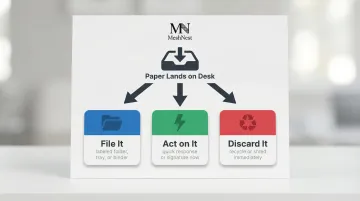
Sticking to this rule stops paper from accumulating in ambiguous "I'll deal with it later" piles. A tiered document tray — one slot per action — makes the system visible and easy to maintain.