Introduction
School offices are among the busiest workspaces in any educational institution. Every day, these administrative hubs handle student records, enrollment paperwork, staff communication, and attendance tracking—while serving as the first point of contact for parents and visitors. That volume of activity makes clutter almost inevitable.
The costs extend well beyond aesthetics. Research from the Princeton Neuroscience Institute shows that visual clutter physically competes with the brain's ability to pay attention, degrading focus over time.
For school administrators, that translates directly to lost time: knowledge workers spend an average of 2.8 hours each week searching for information they need. During enrollment season or exam weeks, those losses hit hardest.
This guide walks through five practical, school-specific strategies—from a one-time purge to habits that stick.
Key Takeaways
- Declutter regularly — paper accumulates fast; a weekly purge schedule stops the pile-up before it starts
- Use proper storage tools — designated zones and mesh organizers cut retrieval time significantly
- Clean consistently - High-touch surfaces need daily attention, not just periodic deep cleans
- Label everything — color-coded labels let any staff member find and return items without guessing
- Build daily habits — a five-minute end-of-day reset beats any monthly overhaul
Way 1: Declutter and Purge Your Paperwork
School offices face a unique paper problem. Attendance sheets, student records, permission slips, administrative memos, and compliance documents pile up relentlessly—often without a clear system for what to keep, archive, or discard.
Apply the State-Specific Retention Rule
Unlike most workplaces, schools cannot rely on general "one-year rules" for document retention. FERPA does not set universal retention periods; these timelines are determined by state law or local policy. Retention requirements vary dramatically by state:
- Texas: Permanent retention required for grades 9-12 academic records; attendance records kept 5 years
- California: Mandatory permanent records preserved indefinitely; interim records disposable after 3rd school year
- Florida: Category A records are permanent; attendance records kept 3 fiscal years
Before purging any document, consult your state's archives or education department retention schedule. Discarding protected records prematurely creates serious compliance liability.
Implement a Four-Tray Paper Triage System
Stop letting papers pile up on desks. Create four clearly labeled processing zones:
- To-Do - Act on these within 24-48 hours before they get buried
- To-File - Completed items ready for permanent storage folders
- To-Scan/Archive Digitally - Safe to digitize, then shred the original
- To-Shred - Expired or superseded documents cleared for destruction
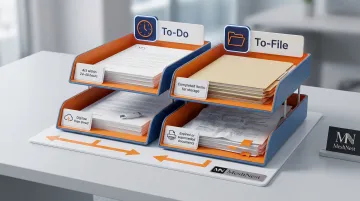
Process all four trays on the same day each week. Pick a low-traffic morning — Friday before close works well for most school offices.
Digitize Strategically
Scanning documents to cloud-based storage cuts physical volume. The Rapid City Area Schools district digitized all student records dating back to 1910, eliminating an 1,800-square-foot storage facility and reducing invoice processing time from over a week to under two hours.
Safe to digitize:
- Routine memos and calendars
- Completed permission slips
- Internal communications
Requires physical retention:
- Original signed compliance documents
- Student records with legal retention requirements
- Official transcripts and certificates
Handle Confidential Documents Properly
School offices hold sensitive student information — and how you destroy it matters as much as how you store it. The U.S. Department of Education's Privacy Technical Assistance Center recommends following NIST Special Publication 800-88 guidelines for physical record disposal.
Approved destruction methods include:
- Cross-cut shredders for most paper records
- Pulverizers or incinerators for highly sensitive files
- Certified third-party shredding vendors — always get a signed certificate of destruction in writing
Way 2: Organize Your Desk and Storage Areas with the Right Tools
Start with a Complete Desk Audit
Clear your desk entirely. Sort every item into three categories:
- Keep at desk — items used multiple times daily
- Store nearby — weekly-use items that belong in drawers or cabinets
- Remove entirely — broken items, duplicates, and irrelevant materials
Only frequently used items should live on your desk surface.
Invest in Durable Desk Organizers
Proper organizers transform chaos into order. Essential desk tools include:
- Multi-compartment caddies for pens, staplers, and sticky notes
- Letter trays or file sorters for active paperwork
- Drawer organizers for small supplies (paper clips, rubber bands, stamps)
Metal mesh organizers work particularly well in school offices — open enough to keep contents visible at a glance, easy to wipe clean, and durable under daily use. For institutional procurement, powder-coated finishes are worth prioritizing: they resist rust and hold up without looking worn, even in high-traffic administrative spaces.
Assign Dedicated Cabinet Zones
Organize cabinets and shelves by logical category:
- Office supplies (paper, folders, binders)
- Student forms (enrollment, attendance, permissions)
- Reference materials (handbooks, directories)
- Filing systems (current year, archived)
The goal: any staff member—not just the person who organized it—should navigate the space independently.
Utilize Vertical and Wall Space
School offices rarely have excess floor space. Wall-mounted file holders, pegboards, and shelving units dramatically expand storage capacity without consuming valuable desk or floor area. In a compact front office, a single pegboard can replace two full drawers of clutter.
Way 3: Deep Clean the Entire Office
School offices see constant foot traffic from students, parents, and staff—meaning surfaces accumulate dust, germs, and grime faster than in typical offices. A study in the Journal of Applied Microbiology found that microbial communities on school desks fully reestablish within just 2 to 5 days — even after standard cleaning removes roughly half of bacteria and fungi. That rapid rebound makes infrequent deep cleans ineffective.
Prioritize High-Touch Surfaces Daily
The CDC recommends that high-touch surfaces such as desks, doorknobs, keyboards, and phones should be cleaned at least once daily. For school offices, this means:
Daily cleaning targets:
- Desk surfaces and countertops
- Door handles and light switches
- Telephones and keyboards
- Shared equipment (printers, copiers)
Weekly deep cleaning:
- Dusting shelves and cabinet tops
- Vacuuming or mopping floors
- Cleaning windows and mirrors
- Emptying and sanitizing trash bins
Link Cleanliness to Staff Health
Maintaining clean surfaces directly impacts absenteeism. A randomized trial in elementary schools demonstrated that disinfectant wipes and hand sanitizer significantly reduced absences caused by gastrointestinal illness. For school offices running on lean staff, that's a meaningful difference — fewer sick days means fewer disruptions to the people keeping daily operations running.
Way 4: Use Labeling and Color-Coding Systems
Transform Personal Systems into Shared Systems
A label transforms a storage spot from "where I put things" into "where everyone puts things." In a school office with multiple staff members, consistent labeling means the system survives staff turnover, absences, and busy periods without breaking down.
Apply Color-Coding by Category
Assign distinct colors to document and supply categories:
- Blue - Student records and academic files
- Red - Urgent/action items requiring immediate attention
- Green - Supplies inventory and procurement
- Yellow - Parent communications and outreach
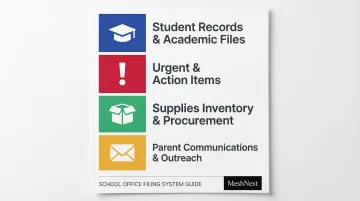
Apply this system to both physical folders and digital file folders for consistency across your workspace.
Why Color-Coding Actually Works
Color-coding's effectiveness isn't anecdotal — high-stakes research backs it up. In emergency departments, replacing single-color chart binders with color-coded groupings reduced misplaced charts from 19.3% to 0.0%.
In paramedic settings, color-coded medication syringes dropped critical dosing errors from 39% to 0%. If color systems can eliminate errors in those environments, a busy school office is well within reach.
Keep It Simple
The tools matter less than the consistency. A few practical ways to start:
- Use label makers, printed adhesive labels, or color-coded sticky dots — pick one and stick to it
- Introduce the system during a team meeting so everyone understands the categories
- Post a one-page color key near the filing area as a quick reference
A system staff actually uses every day outperforms a sophisticated one that gets ignored within a week.
Way 5: Build Daily Tidying Habits and Routines
A clean office doesn't stay that way on its own. Without deliberate daily habits, even well-organized offices revert to clutter within weeks.
Implement a 5-Minute End-of-Day Desk Reset
Research shows that heavy workloads lead to emotional exhaustion, which increases decisional procrastination and directly results in physical office clutter. Combat this with a simple end-of-day routine:
- Clear the desk surface completely
- Return items to designated spots
- Process "to-file" and "to-shred" trays
- Review tomorrow's priorities
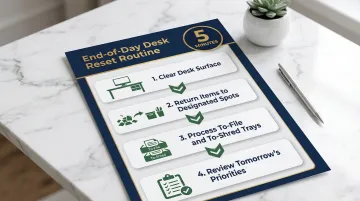
Doing this at day's end means you walk in the next morning to a clean desk — ready to start work, not undo yesterday's mess.
Schedule Weekly Mini-Organization Sessions
Dedicate 10-15 minutes each week (same day, same time) to:
- Check supply levels and restock as needed
- Clear inbox piles
- Quick scan of cabinet and shelf order
- Address any emerging clutter hotspots
Establish Shared Standards for Multi-Staff Offices
When multiple people share the office, create a simple team agreement:
- Everyone returns items after use
- No "temporary" stacking on clear surfaces
- End-of-day reset is a team responsibility, not one person's job
These shared rules work best when they're tied to a fixed trigger. Behavioral science research confirms that "if-then" implementation intentions have a medium-to-large effect on goal attainment. In practice: "If it's 3:55 PM, then I clear my desk." Consistent cues like this help staff stick to the habit without overthinking it.
Frequently Asked Questions
What are the 5 steps of organizing?
The five general organizing steps are: sort and declutter items, assign a designated home to everything, group items into labeled containers by category, label everything clearly, and build a consistent maintenance routine. Skipping that last step is why most systems fall apart within weeks.
How often should a school office be deep cleaned?
High-touch surfaces like desks, phones, keyboards, and door handles should be wiped down daily. A full deep clean—dusting, vacuuming, mopping—should be conducted weekly due to high foot traffic typical of school environments.
What are the best organizers for a school office desk?
The most useful desk organizers include a multi-compartment caddy for writing tools, a letter tray or file sorter for active paperwork, and a drawer organizer for small supplies. Metal mesh options are particularly durable and easy to maintain in busy office settings. For institutional bulk orders, contact MeshNest on WhatsApp at +91 98370 74236 to discuss product options and volume pricing.
How do you manage paperwork in a school office?
Implement a four-tray paper triage system: To-Do, To-File, To-Scan, and To-Shred. Process each tray weekly so papers never accumulate into unmanageable stacks. Always verify state-specific retention requirements before discarding any student records.
How can I keep the school office organized during a busy school year?
A daily 5-minute end-of-day reset and a weekly 10-minute organization check prevents the buildup that leads to time-consuming overhauls, especially during enrollment and exam seasons.
What should be done at the end of the school year to organize a school office?
Purge outdated paperwork per state retention guidelines, archive completed student records digitally, restock and reorganize supplies for the new year, and conduct a full deep clean before the office sits largely unused over summer.